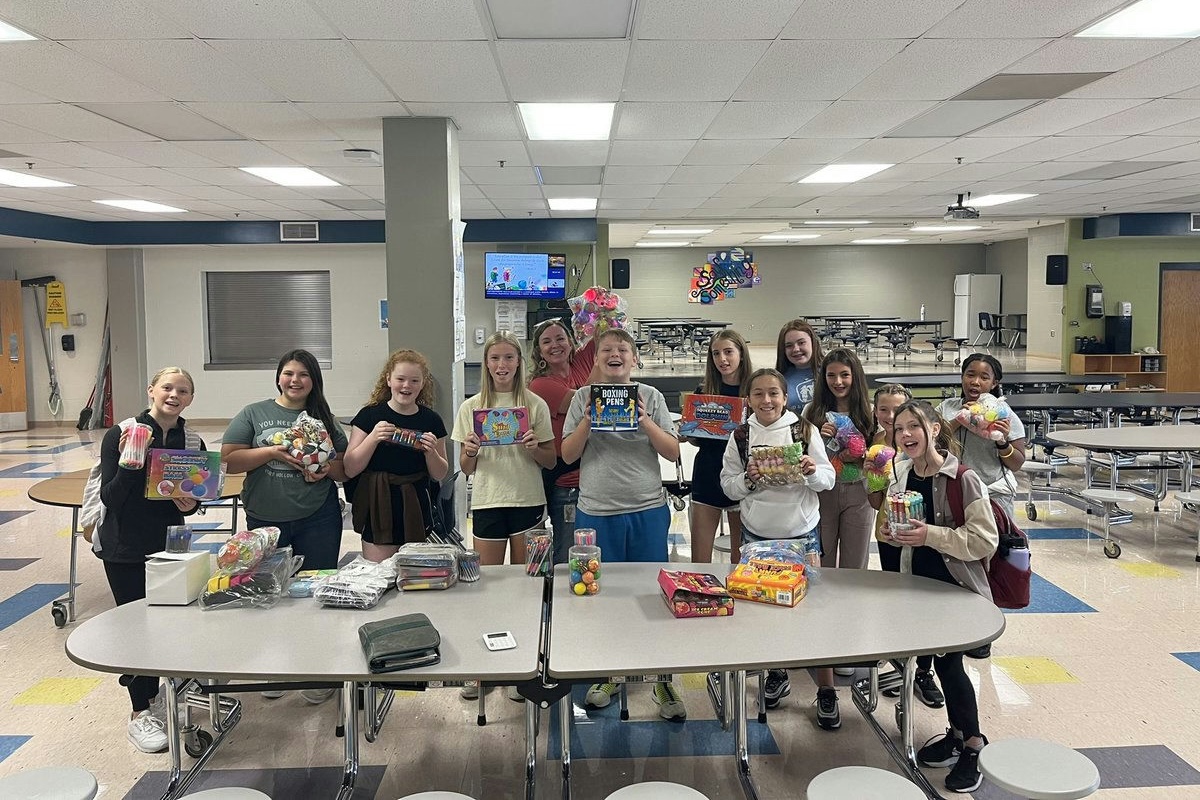
Forest Middle’s hybrid store model boosts student buy-in with online shopping, passes, and a Friday prize room.

Track inventory in your school and classroom rewards stores, offer Amazon-style shopping to students, and more!


Launch a school-wide behavior and rewards system that's motivational for students and easy for teachers.
Create camaraderie and friendly competition with a school-wide House Points system. Join an interactive demo to learn more!

Track behavior, motivate students, and promote a positive culture – all in one easy platform.

When students at Forest Middle School log into LiveSchool, their rewards store looks like something they already know by heart: online shopping.
Thumbnails. Carts. Checkout. Confetti.
“It looks like an Amazon shopping store… they absolutely love it.” — Noemi Ellis, Forest Middle
Behind that “Amazon-style” experience is a hybrid rewards model that pairs online browsing with a physical Friday prize store, printed passes for privileges, and even a drone raffle—all designed to increase student participation without piling on extra work for teachers.
In this story, two site leaders, Noemi Ellis and Amanda Martin, walk through how Forest Middle:
Forest Middle serves a big sixth-grade cohort—around 300 students—with seventh and eighth grade steadily ramping into Student Shopping as well.
Teachers were already balancing:
They needed a system where:
Noemi led the charge on the digital side. She set up Forest’s online catalog with clear visuals and simple navigation.
“Setting it up was very simple. I thought it was very self explanatory.” — Noemi
To polish the experience:
“They love the experience about shopping and putting in their cart and then purchasing it. I like the little confetti that comes up when they purchase it.” — Noemi.
Even better, students can log in through Clever, so access feels natural and familiar.
Students at Forest Middle are not only exploring the store—they’re using it nonstop. In just one semester:
Most-wanted items:
When a system is this easy and this fun, students don’t need reminders—they show up. And Forest’s numbers prove it.
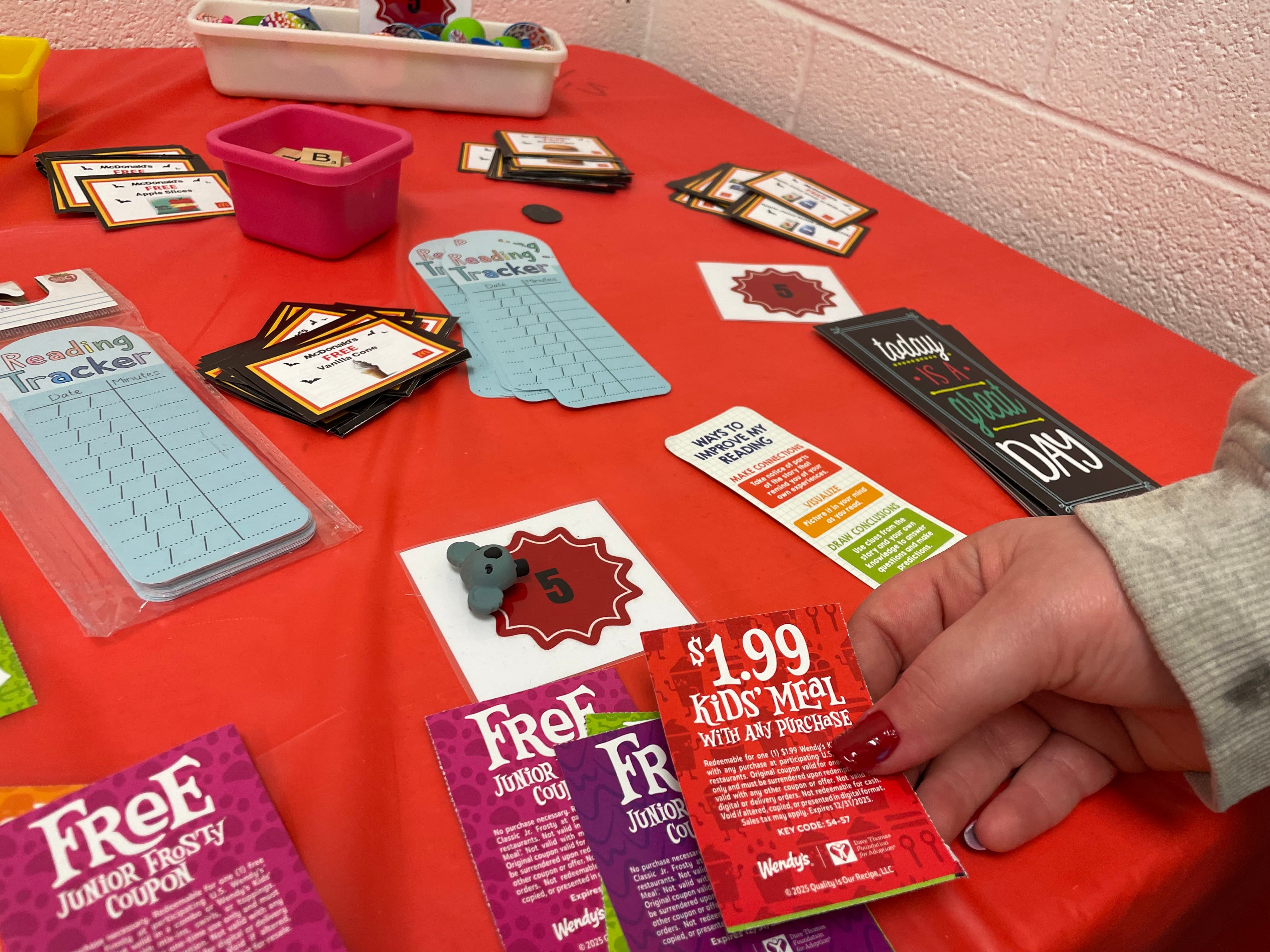
Forest’s store isn’t simply about stuff.
Some of the highest-impact rewards are experiences and privileges—things like:
To make these work at scale, Noemi created printed pass templates.
“I created like a template of passes for things that are not tangible… like sit-with-a-buddy pass… that way the teachers could actually fill it out, click fulfill, and give it to them.” — Noemi
Here’s how it fits together:
Because the pass system is consistent, even teachers who don’t live inside the app every day can still honor rewards. For a big school, that’s key

“Some teachers really get into it…there are some teachers that don’t want to do that. So that’s why we still kind of use the physical paper copy. Because that way the teachers are still participating without them having to go into the system.” — Noemi
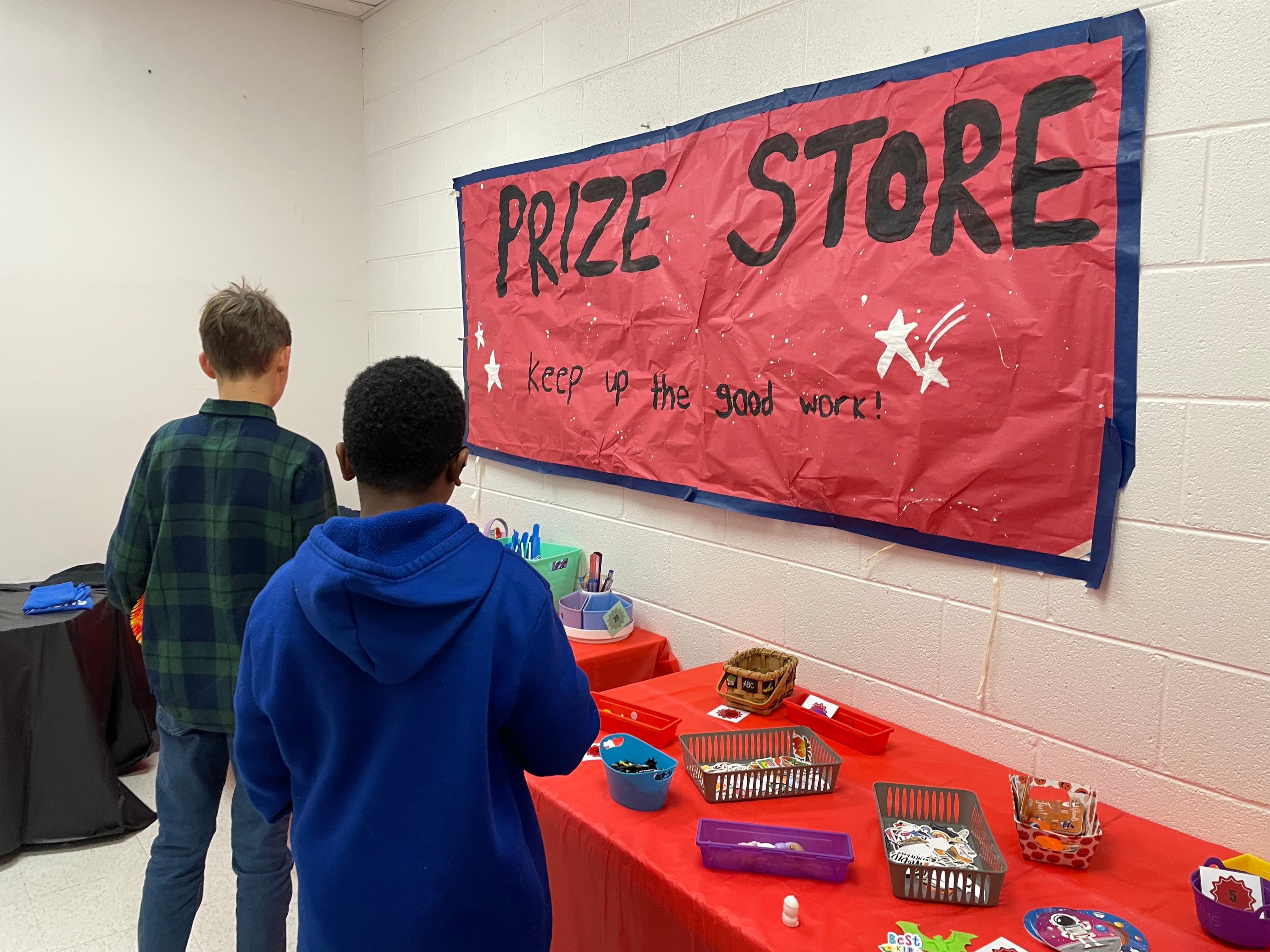
On Fridays, Forest’s rewards experience goes fully offline.
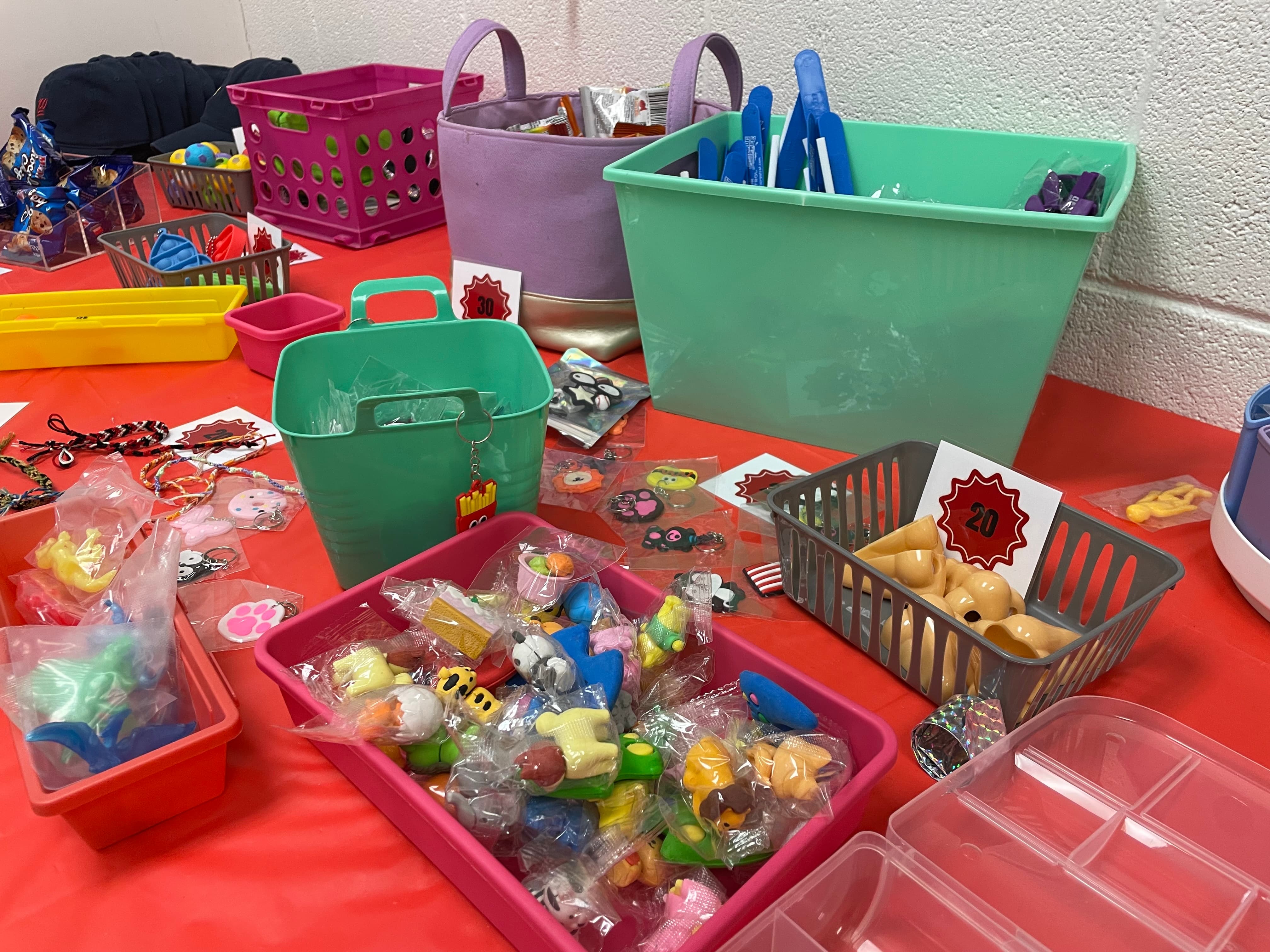
Amanda Martin runs a grade-level prize room—a decorated closet/room that has become a weekly event.
“We had like little carts with prizes… but this year we actually have a little closet slash room that we turned into a store and it’s like decorated and the kids are really liking it.” — Amanda Martin
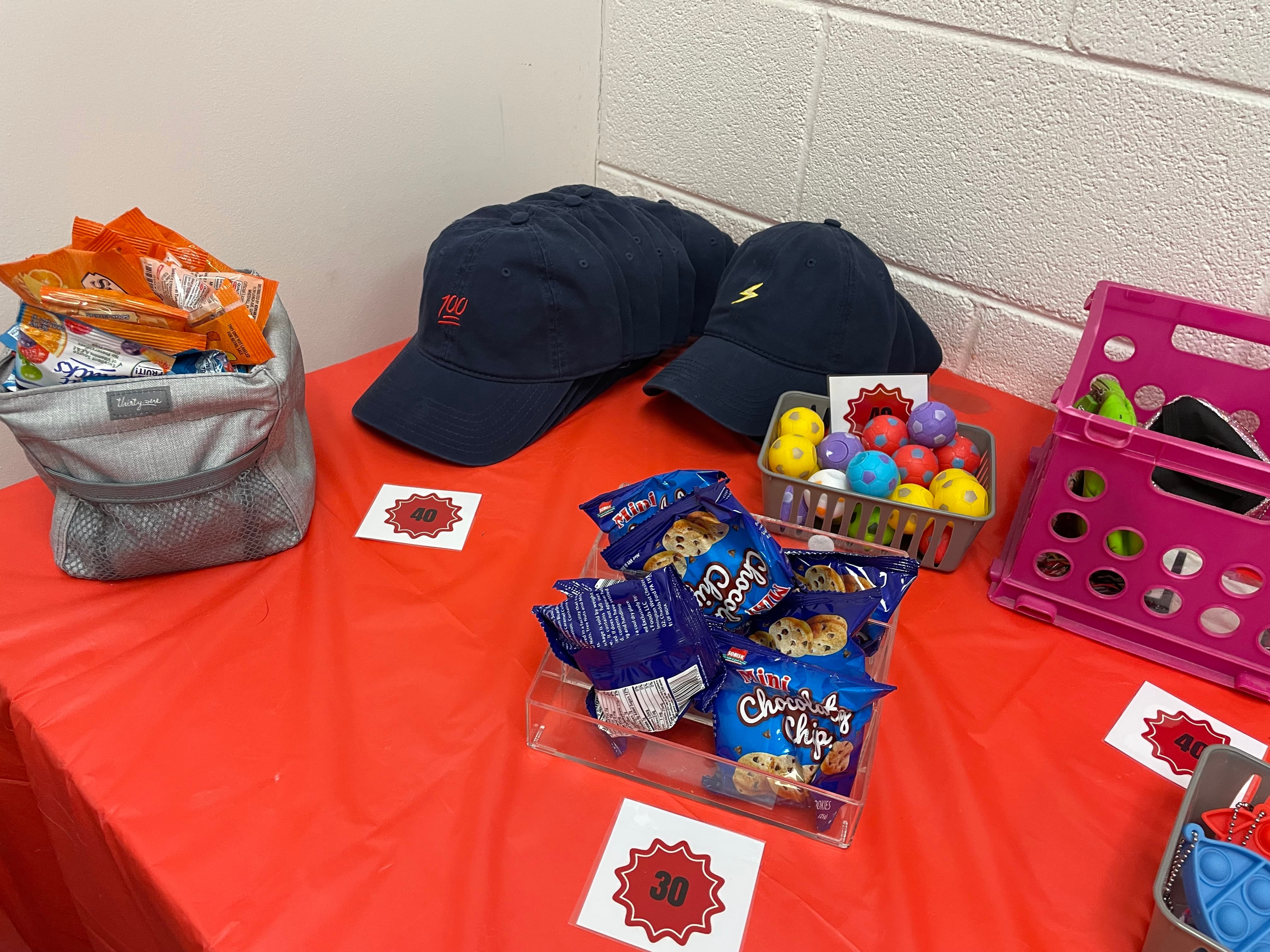
What makes the system work in real life:
“We have a grade level store and it’s stockpiled with all kinds of little knickknacks and candy… We got some donations from businesses like Chick-fil-A and Wendy’s where we sell little coupon cards.” — Amanda
With roughly 300 sixth graders and up to 60 students coming through the store in one morning, the paper pass system keeps the line moving while staff quickly confirm purchases on-screen.
To add big-moment excitement, Amanda’s team used Student Shopping to run a drone raffle.
“We tried a raffle… kids were able to buy however many raffle tickets they wanted for a drone. And then we did a drone drawing.” — Amanda
Their pattern
Use LiveSchool’s Fulfillment tab to bulk-fulfill all tickets afterward.
It’s a simple template any school can reuse—for holiday raffles, grade-level celebrations, or end-of-year events—without adding spreadsheet chaos.
A core goal at Forest: reward systems should reduce, not increase, teacher workload.
Student Shopping helps on both sides:
“Our sixth graders are… it’s easier for them and it’s on their terms and they can do it also when it’s convenient to them.” — Amanda
Amanda doesn’t run “shopping conferences” at her desk anymore.
Instead, she sets expectations up front:
“They feel like they’re going shopping, and it makes less work on teachers.” — Amanda
Noemi leans heavily on LiveSchool’s Fulfillment tab:
“I love the Fulfillment tab… it’s easier for us to see what has been fulfilled, what hasn’t been fulfilled.”
And for staff who worry about tech, the search and filters are intentionally simple:
Like many schools, Forest is still nudging some teachers to focus more on positive points than demerits.
Noemi uses LiveSchool’s reports to track demerits for things like lunch detention and has her eye on how the platform can keep evolving—especially around archiving behavior data.
“I would love if we could archive demerits instead of just deleting them altogether… I still want to keep track of that behavior.” — Noemi
That kind of feedback loop—from real site leaders back to the product—helps LiveSchool keep behavior data meaningful and manageable.
If you’re looking to move from a single, crowded store to something more equitable and efficient, Forest Middle’s playbook is a great place to start:
1. Launch an “Amazon-style” Online Store
2. Use Pass Templates for Intangibles
3. Open a Weekly Prize Room
4. Add a Seasonal Raffle
Pull a winner and bulk-fulfill tickets once it’s done.
When students feel like they’re really shopping, and when teachers can manage it all in a few focused blocks of time each week—your rewards system stops being “one more thing” and starts becoming a culture driver.
Ready to turn your rewards program into something students line up for? See how LiveSchool’s Student Shopping can help you combine online browsing, passes, and a weekly prize room—without burning out your staff.
Track inventory in your school and classroom rewards stores, offer Amazon-style shopping to students, and more!
Launch a school-wide behavior and rewards system that's motivational for students and easy for teachers.
Create camaraderie and friendly competition with a school-wide House Points system. Join an interactive demo to learn more!
Track behavior, motivate students, and promote a positive culture – all in one easy platform.
When students at Forest Middle School log into LiveSchool, their rewards store looks like something they already know by heart: online shopping.
Thumbnails. Carts. Checkout. Confetti.
“It looks like an Amazon shopping store… they absolutely love it.” — Noemi Ellis, Forest Middle
Behind that “Amazon-style” experience is a hybrid rewards model that pairs online browsing with a physical Friday prize store, printed passes for privileges, and even a drone raffle—all designed to increase student participation without piling on extra work for teachers.
In this story, two site leaders, Noemi Ellis and Amanda Martin, walk through how Forest Middle:
Forest Middle serves a big sixth-grade cohort—around 300 students—with seventh and eighth grade steadily ramping into Student Shopping as well.
Teachers were already balancing:
They needed a system where:
Noemi led the charge on the digital side. She set up Forest’s online catalog with clear visuals and simple navigation.
“Setting it up was very simple. I thought it was very self explanatory.” — Noemi
To polish the experience:
“They love the experience about shopping and putting in their cart and then purchasing it. I like the little confetti that comes up when they purchase it.” — Noemi.
Even better, students can log in through Clever, so access feels natural and familiar.
Students at Forest Middle are not only exploring the store—they’re using it nonstop. In just one semester:
Most-wanted items:
When a system is this easy and this fun, students don’t need reminders—they show up. And Forest’s numbers prove it.
Forest’s store isn’t simply about stuff.
Some of the highest-impact rewards are experiences and privileges—things like:
To make these work at scale, Noemi created printed pass templates.
“I created like a template of passes for things that are not tangible… like sit-with-a-buddy pass… that way the teachers could actually fill it out, click fulfill, and give it to them.” — Noemi
Here’s how it fits together:
Because the pass system is consistent, even teachers who don’t live inside the app every day can still honor rewards. For a big school, that’s key
“Some teachers really get into it…there are some teachers that don’t want to do that. So that’s why we still kind of use the physical paper copy. Because that way the teachers are still participating without them having to go into the system.” — Noemi
On Fridays, Forest’s rewards experience goes fully offline.
Amanda Martin runs a grade-level prize room—a decorated closet/room that has become a weekly event.
“We had like little carts with prizes… but this year we actually have a little closet slash room that we turned into a store and it’s like decorated and the kids are really liking it.” — Amanda Martin
What makes the system work in real life:
“We have a grade level store and it’s stockpiled with all kinds of little knickknacks and candy… We got some donations from businesses like Chick-fil-A and Wendy’s where we sell little coupon cards.” — Amanda
With roughly 300 sixth graders and up to 60 students coming through the store in one morning, the paper pass system keeps the line moving while staff quickly confirm purchases on-screen.
To add big-moment excitement, Amanda’s team used Student Shopping to run a drone raffle.
“We tried a raffle… kids were able to buy however many raffle tickets they wanted for a drone. And then we did a drone drawing.” — Amanda
Their pattern
Use LiveSchool’s Fulfillment tab to bulk-fulfill all tickets afterward.
It’s a simple template any school can reuse—for holiday raffles, grade-level celebrations, or end-of-year events—without adding spreadsheet chaos.
A core goal at Forest: reward systems should reduce, not increase, teacher workload.
Student Shopping helps on both sides:
“Our sixth graders are… it’s easier for them and it’s on their terms and they can do it also when it’s convenient to them.” — Amanda
Amanda doesn’t run “shopping conferences” at her desk anymore.
Instead, she sets expectations up front:
“They feel like they’re going shopping, and it makes less work on teachers.” — Amanda
Noemi leans heavily on LiveSchool’s Fulfillment tab:
“I love the Fulfillment tab… it’s easier for us to see what has been fulfilled, what hasn’t been fulfilled.”
And for staff who worry about tech, the search and filters are intentionally simple:
Like many schools, Forest is still nudging some teachers to focus more on positive points than demerits.
Noemi uses LiveSchool’s reports to track demerits for things like lunch detention and has her eye on how the platform can keep evolving—especially around archiving behavior data.
“I would love if we could archive demerits instead of just deleting them altogether… I still want to keep track of that behavior.” — Noemi
That kind of feedback loop—from real site leaders back to the product—helps LiveSchool keep behavior data meaningful and manageable.
If you’re looking to move from a single, crowded store to something more equitable and efficient, Forest Middle’s playbook is a great place to start:
1. Launch an “Amazon-style” Online Store
2. Use Pass Templates for Intangibles
3. Open a Weekly Prize Room
4. Add a Seasonal Raffle
Pull a winner and bulk-fulfill tickets once it’s done.
When students feel like they’re really shopping, and when teachers can manage it all in a few focused blocks of time each week—your rewards system stops being “one more thing” and starts becoming a culture driver.
Ready to turn your rewards program into something students line up for? See how LiveSchool’s Student Shopping can help you combine online browsing, passes, and a weekly prize room—without burning out your staff.
Track inventory in your school and classroom rewards stores, offer Amazon-style shopping to students, and more!
Launch a school-wide behavior and rewards system that's motivational for students and easy for teachers.
Create camaraderie and friendly competition with a school-wide House Points system. Join an interactive demo to learn more!
Track behavior, motivate students, and promote a positive culture – all in one easy platform.
When students at Forest Middle School log into LiveSchool, their rewards store looks like something they already know by heart: online shopping.
Thumbnails. Carts. Checkout. Confetti.
“It looks like an Amazon shopping store… they absolutely love it.” — Noemi Ellis, Forest Middle
Behind that “Amazon-style” experience is a hybrid rewards model that pairs online browsing with a physical Friday prize store, printed passes for privileges, and even a drone raffle—all designed to increase student participation without piling on extra work for teachers.
In this story, two site leaders, Noemi Ellis and Amanda Martin, walk through how Forest Middle:
Forest Middle serves a big sixth-grade cohort—around 300 students—with seventh and eighth grade steadily ramping into Student Shopping as well.
Teachers were already balancing:
They needed a system where:
Noemi led the charge on the digital side. She set up Forest’s online catalog with clear visuals and simple navigation.
“Setting it up was very simple. I thought it was very self explanatory.” — Noemi
To polish the experience:
“They love the experience about shopping and putting in their cart and then purchasing it. I like the little confetti that comes up when they purchase it.” — Noemi.
Even better, students can log in through Clever, so access feels natural and familiar.
Students at Forest Middle are not only exploring the store—they’re using it nonstop. In just one semester:
Most-wanted items:
When a system is this easy and this fun, students don’t need reminders—they show up. And Forest’s numbers prove it.
Forest’s store isn’t simply about stuff.
Some of the highest-impact rewards are experiences and privileges—things like:
To make these work at scale, Noemi created printed pass templates.
“I created like a template of passes for things that are not tangible… like sit-with-a-buddy pass… that way the teachers could actually fill it out, click fulfill, and give it to them.” — Noemi
Here’s how it fits together:
Because the pass system is consistent, even teachers who don’t live inside the app every day can still honor rewards. For a big school, that’s key
“Some teachers really get into it…there are some teachers that don’t want to do that. So that’s why we still kind of use the physical paper copy. Because that way the teachers are still participating without them having to go into the system.” — Noemi
On Fridays, Forest’s rewards experience goes fully offline.
Amanda Martin runs a grade-level prize room—a decorated closet/room that has become a weekly event.
“We had like little carts with prizes… but this year we actually have a little closet slash room that we turned into a store and it’s like decorated and the kids are really liking it.” — Amanda Martin
What makes the system work in real life:
“We have a grade level store and it’s stockpiled with all kinds of little knickknacks and candy… We got some donations from businesses like Chick-fil-A and Wendy’s where we sell little coupon cards.” — Amanda
With roughly 300 sixth graders and up to 60 students coming through the store in one morning, the paper pass system keeps the line moving while staff quickly confirm purchases on-screen.
To add big-moment excitement, Amanda’s team used Student Shopping to run a drone raffle.
“We tried a raffle… kids were able to buy however many raffle tickets they wanted for a drone. And then we did a drone drawing.” — Amanda
Their pattern
Use LiveSchool’s Fulfillment tab to bulk-fulfill all tickets afterward.
It’s a simple template any school can reuse—for holiday raffles, grade-level celebrations, or end-of-year events—without adding spreadsheet chaos.
A core goal at Forest: reward systems should reduce, not increase, teacher workload.
Student Shopping helps on both sides:
“Our sixth graders are… it’s easier for them and it’s on their terms and they can do it also when it’s convenient to them.” — Amanda
Amanda doesn’t run “shopping conferences” at her desk anymore.
Instead, she sets expectations up front:
“They feel like they’re going shopping, and it makes less work on teachers.” — Amanda
Noemi leans heavily on LiveSchool’s Fulfillment tab:
“I love the Fulfillment tab… it’s easier for us to see what has been fulfilled, what hasn’t been fulfilled.”
And for staff who worry about tech, the search and filters are intentionally simple:
Like many schools, Forest is still nudging some teachers to focus more on positive points than demerits.
Noemi uses LiveSchool’s reports to track demerits for things like lunch detention and has her eye on how the platform can keep evolving—especially around archiving behavior data.
“I would love if we could archive demerits instead of just deleting them altogether… I still want to keep track of that behavior.” — Noemi
That kind of feedback loop—from real site leaders back to the product—helps LiveSchool keep behavior data meaningful and manageable.
If you’re looking to move from a single, crowded store to something more equitable and efficient, Forest Middle’s playbook is a great place to start:
1. Launch an “Amazon-style” Online Store
2. Use Pass Templates for Intangibles
3. Open a Weekly Prize Room
4. Add a Seasonal Raffle
Pull a winner and bulk-fulfill tickets once it’s done.
When students feel like they’re really shopping, and when teachers can manage it all in a few focused blocks of time each week—your rewards system stops being “one more thing” and starts becoming a culture driver.
Ready to turn your rewards program into something students line up for? See how LiveSchool’s Student Shopping can help you combine online browsing, passes, and a weekly prize room—without burning out your staff.
When students at Forest Middle School log into LiveSchool, their rewards store looks like something they already know by heart: online shopping.
Thumbnails. Carts. Checkout. Confetti.
“It looks like an Amazon shopping store… they absolutely love it.” — Noemi Ellis, Forest Middle
Behind that “Amazon-style” experience is a hybrid rewards model that pairs online browsing with a physical Friday prize store, printed passes for privileges, and even a drone raffle—all designed to increase student participation without piling on extra work for teachers.
In this story, two site leaders, Noemi Ellis and Amanda Martin, walk through how Forest Middle:
Forest Middle serves a big sixth-grade cohort—around 300 students—with seventh and eighth grade steadily ramping into Student Shopping as well.
Teachers were already balancing:
They needed a system where:
Noemi led the charge on the digital side. She set up Forest’s online catalog with clear visuals and simple navigation.
“Setting it up was very simple. I thought it was very self explanatory.” — Noemi
To polish the experience:
“They love the experience about shopping and putting in their cart and then purchasing it. I like the little confetti that comes up when they purchase it.” — Noemi.
Even better, students can log in through Clever, so access feels natural and familiar.
Students at Forest Middle are not only exploring the store—they’re using it nonstop. In just one semester:
Most-wanted items:
When a system is this easy and this fun, students don’t need reminders—they show up. And Forest’s numbers prove it.
Forest’s store isn’t simply about stuff.
Some of the highest-impact rewards are experiences and privileges—things like:
To make these work at scale, Noemi created printed pass templates.
“I created like a template of passes for things that are not tangible… like sit-with-a-buddy pass… that way the teachers could actually fill it out, click fulfill, and give it to them.” — Noemi
Here’s how it fits together:
Because the pass system is consistent, even teachers who don’t live inside the app every day can still honor rewards. For a big school, that’s key
“Some teachers really get into it…there are some teachers that don’t want to do that. So that’s why we still kind of use the physical paper copy. Because that way the teachers are still participating without them having to go into the system.” — Noemi
On Fridays, Forest’s rewards experience goes fully offline.
Amanda Martin runs a grade-level prize room—a decorated closet/room that has become a weekly event.
“We had like little carts with prizes… but this year we actually have a little closet slash room that we turned into a store and it’s like decorated and the kids are really liking it.” — Amanda Martin
What makes the system work in real life:
“We have a grade level store and it’s stockpiled with all kinds of little knickknacks and candy… We got some donations from businesses like Chick-fil-A and Wendy’s where we sell little coupon cards.” — Amanda
With roughly 300 sixth graders and up to 60 students coming through the store in one morning, the paper pass system keeps the line moving while staff quickly confirm purchases on-screen.
To add big-moment excitement, Amanda’s team used Student Shopping to run a drone raffle.
“We tried a raffle… kids were able to buy however many raffle tickets they wanted for a drone. And then we did a drone drawing.” — Amanda
Their pattern
Use LiveSchool’s Fulfillment tab to bulk-fulfill all tickets afterward.
It’s a simple template any school can reuse—for holiday raffles, grade-level celebrations, or end-of-year events—without adding spreadsheet chaos.
A core goal at Forest: reward systems should reduce, not increase, teacher workload.
Student Shopping helps on both sides:
“Our sixth graders are… it’s easier for them and it’s on their terms and they can do it also when it’s convenient to them.” — Amanda
Amanda doesn’t run “shopping conferences” at her desk anymore.
Instead, she sets expectations up front:
“They feel like they’re going shopping, and it makes less work on teachers.” — Amanda
Noemi leans heavily on LiveSchool’s Fulfillment tab:
“I love the Fulfillment tab… it’s easier for us to see what has been fulfilled, what hasn’t been fulfilled.”
And for staff who worry about tech, the search and filters are intentionally simple:
Like many schools, Forest is still nudging some teachers to focus more on positive points than demerits.
Noemi uses LiveSchool’s reports to track demerits for things like lunch detention and has her eye on how the platform can keep evolving—especially around archiving behavior data.
“I would love if we could archive demerits instead of just deleting them altogether… I still want to keep track of that behavior.” — Noemi
That kind of feedback loop—from real site leaders back to the product—helps LiveSchool keep behavior data meaningful and manageable.
If you’re looking to move from a single, crowded store to something more equitable and efficient, Forest Middle’s playbook is a great place to start:
1. Launch an “Amazon-style” Online Store
2. Use Pass Templates for Intangibles
3. Open a Weekly Prize Room
4. Add a Seasonal Raffle
Pull a winner and bulk-fulfill tickets once it’s done.
When students feel like they’re really shopping, and when teachers can manage it all in a few focused blocks of time each week—your rewards system stops being “one more thing” and starts becoming a culture driver.
Ready to turn your rewards program into something students line up for? See how LiveSchool’s Student Shopping can help you combine online browsing, passes, and a weekly prize room—without burning out your staff.
You know what they teamwork makes the dream work. These articles have been written by the wonderful members of our team.
Track inventory in your school and classroom rewards stores, offer Amazon-style shopping to students, and more!
Launch a school-wide behavior and rewards system that's motivational for students and easy for teachers.
Create camaraderie and friendly competition with a school-wide House Points system. Join an interactive demo to learn more!
Track behavior, motivate students, and promote a positive culture – all in one easy platform.
When students at Forest Middle School log into LiveSchool, their rewards store looks like something they already know by heart: online shopping.
Thumbnails. Carts. Checkout. Confetti.
“It looks like an Amazon shopping store… they absolutely love it.” — Noemi Ellis, Forest Middle
Behind that “Amazon-style” experience is a hybrid rewards model that pairs online browsing with a physical Friday prize store, printed passes for privileges, and even a drone raffle—all designed to increase student participation without piling on extra work for teachers.
In this story, two site leaders, Noemi Ellis and Amanda Martin, walk through how Forest Middle:
Forest Middle serves a big sixth-grade cohort—around 300 students—with seventh and eighth grade steadily ramping into Student Shopping as well.
Teachers were already balancing:
They needed a system where:
Noemi led the charge on the digital side. She set up Forest’s online catalog with clear visuals and simple navigation.
“Setting it up was very simple. I thought it was very self explanatory.” — Noemi
To polish the experience:
“They love the experience about shopping and putting in their cart and then purchasing it. I like the little confetti that comes up when they purchase it.” — Noemi.
Even better, students can log in through Clever, so access feels natural and familiar.
Students at Forest Middle are not only exploring the store—they’re using it nonstop. In just one semester:
Most-wanted items:
When a system is this easy and this fun, students don’t need reminders—they show up. And Forest’s numbers prove it.
Forest’s store isn’t simply about stuff.
Some of the highest-impact rewards are experiences and privileges—things like:
To make these work at scale, Noemi created printed pass templates.
“I created like a template of passes for things that are not tangible… like sit-with-a-buddy pass… that way the teachers could actually fill it out, click fulfill, and give it to them.” — Noemi
Here’s how it fits together:
Because the pass system is consistent, even teachers who don’t live inside the app every day can still honor rewards. For a big school, that’s key
“Some teachers really get into it…there are some teachers that don’t want to do that. So that’s why we still kind of use the physical paper copy. Because that way the teachers are still participating without them having to go into the system.” — Noemi
On Fridays, Forest’s rewards experience goes fully offline.
Amanda Martin runs a grade-level prize room—a decorated closet/room that has become a weekly event.
“We had like little carts with prizes… but this year we actually have a little closet slash room that we turned into a store and it’s like decorated and the kids are really liking it.” — Amanda Martin
What makes the system work in real life:
“We have a grade level store and it’s stockpiled with all kinds of little knickknacks and candy… We got some donations from businesses like Chick-fil-A and Wendy’s where we sell little coupon cards.” — Amanda
With roughly 300 sixth graders and up to 60 students coming through the store in one morning, the paper pass system keeps the line moving while staff quickly confirm purchases on-screen.
To add big-moment excitement, Amanda’s team used Student Shopping to run a drone raffle.
“We tried a raffle… kids were able to buy however many raffle tickets they wanted for a drone. And then we did a drone drawing.” — Amanda
Their pattern
Use LiveSchool’s Fulfillment tab to bulk-fulfill all tickets afterward.
It’s a simple template any school can reuse—for holiday raffles, grade-level celebrations, or end-of-year events—without adding spreadsheet chaos.
A core goal at Forest: reward systems should reduce, not increase, teacher workload.
Student Shopping helps on both sides:
“Our sixth graders are… it’s easier for them and it’s on their terms and they can do it also when it’s convenient to them.” — Amanda
Amanda doesn’t run “shopping conferences” at her desk anymore.
Instead, she sets expectations up front:
“They feel like they’re going shopping, and it makes less work on teachers.” — Amanda
Noemi leans heavily on LiveSchool’s Fulfillment tab:
“I love the Fulfillment tab… it’s easier for us to see what has been fulfilled, what hasn’t been fulfilled.”
And for staff who worry about tech, the search and filters are intentionally simple:
Like many schools, Forest is still nudging some teachers to focus more on positive points than demerits.
Noemi uses LiveSchool’s reports to track demerits for things like lunch detention and has her eye on how the platform can keep evolving—especially around archiving behavior data.
“I would love if we could archive demerits instead of just deleting them altogether… I still want to keep track of that behavior.” — Noemi
That kind of feedback loop—from real site leaders back to the product—helps LiveSchool keep behavior data meaningful and manageable.
If you’re looking to move from a single, crowded store to something more equitable and efficient, Forest Middle’s playbook is a great place to start:
1. Launch an “Amazon-style” Online Store
2. Use Pass Templates for Intangibles
3. Open a Weekly Prize Room
4. Add a Seasonal Raffle
Pull a winner and bulk-fulfill tickets once it’s done.
When students feel like they’re really shopping, and when teachers can manage it all in a few focused blocks of time each week—your rewards system stops being “one more thing” and starts becoming a culture driver.
Ready to turn your rewards program into something students line up for? See how LiveSchool’s Student Shopping can help you combine online browsing, passes, and a weekly prize room—without burning out your staff.
Track inventory in your school and classroom rewards stores, offer Amazon-style shopping to students, and more!
Launch a school-wide behavior and rewards system that's motivational for students and easy for teachers.
Create camaraderie and friendly competition with a school-wide House Points system. Join an interactive demo to learn more!
Track behavior, motivate students, and promote a positive culture – all in one easy platform.
When students at Forest Middle School log into LiveSchool, their rewards store looks like something they already know by heart: online shopping.
Thumbnails. Carts. Checkout. Confetti.
“It looks like an Amazon shopping store… they absolutely love it.” — Noemi Ellis, Forest Middle
Behind that “Amazon-style” experience is a hybrid rewards model that pairs online browsing with a physical Friday prize store, printed passes for privileges, and even a drone raffle—all designed to increase student participation without piling on extra work for teachers.
In this story, two site leaders, Noemi Ellis and Amanda Martin, walk through how Forest Middle:
Forest Middle serves a big sixth-grade cohort—around 300 students—with seventh and eighth grade steadily ramping into Student Shopping as well.
Teachers were already balancing:
They needed a system where:
Noemi led the charge on the digital side. She set up Forest’s online catalog with clear visuals and simple navigation.
“Setting it up was very simple. I thought it was very self explanatory.” — Noemi
To polish the experience:
“They love the experience about shopping and putting in their cart and then purchasing it. I like the little confetti that comes up when they purchase it.” — Noemi.
Even better, students can log in through Clever, so access feels natural and familiar.
Students at Forest Middle are not only exploring the store—they’re using it nonstop. In just one semester:
Most-wanted items:
When a system is this easy and this fun, students don’t need reminders—they show up. And Forest’s numbers prove it.
Forest’s store isn’t simply about stuff.
Some of the highest-impact rewards are experiences and privileges—things like:
To make these work at scale, Noemi created printed pass templates.
“I created like a template of passes for things that are not tangible… like sit-with-a-buddy pass… that way the teachers could actually fill it out, click fulfill, and give it to them.” — Noemi
Here’s how it fits together:
Because the pass system is consistent, even teachers who don’t live inside the app every day can still honor rewards. For a big school, that’s key
“Some teachers really get into it…there are some teachers that don’t want to do that. So that’s why we still kind of use the physical paper copy. Because that way the teachers are still participating without them having to go into the system.” — Noemi
On Fridays, Forest’s rewards experience goes fully offline.
Amanda Martin runs a grade-level prize room—a decorated closet/room that has become a weekly event.
“We had like little carts with prizes… but this year we actually have a little closet slash room that we turned into a store and it’s like decorated and the kids are really liking it.” — Amanda Martin
What makes the system work in real life:
“We have a grade level store and it’s stockpiled with all kinds of little knickknacks and candy… We got some donations from businesses like Chick-fil-A and Wendy’s where we sell little coupon cards.” — Amanda
With roughly 300 sixth graders and up to 60 students coming through the store in one morning, the paper pass system keeps the line moving while staff quickly confirm purchases on-screen.
To add big-moment excitement, Amanda’s team used Student Shopping to run a drone raffle.
“We tried a raffle… kids were able to buy however many raffle tickets they wanted for a drone. And then we did a drone drawing.” — Amanda
Their pattern
Use LiveSchool’s Fulfillment tab to bulk-fulfill all tickets afterward.
It’s a simple template any school can reuse—for holiday raffles, grade-level celebrations, or end-of-year events—without adding spreadsheet chaos.
A core goal at Forest: reward systems should reduce, not increase, teacher workload.
Student Shopping helps on both sides:
“Our sixth graders are… it’s easier for them and it’s on their terms and they can do it also when it’s convenient to them.” — Amanda
Amanda doesn’t run “shopping conferences” at her desk anymore.
Instead, she sets expectations up front:
“They feel like they’re going shopping, and it makes less work on teachers.” — Amanda
Noemi leans heavily on LiveSchool’s Fulfillment tab:
“I love the Fulfillment tab… it’s easier for us to see what has been fulfilled, what hasn’t been fulfilled.”
And for staff who worry about tech, the search and filters are intentionally simple:
Like many schools, Forest is still nudging some teachers to focus more on positive points than demerits.
Noemi uses LiveSchool’s reports to track demerits for things like lunch detention and has her eye on how the platform can keep evolving—especially around archiving behavior data.
“I would love if we could archive demerits instead of just deleting them altogether… I still want to keep track of that behavior.” — Noemi
That kind of feedback loop—from real site leaders back to the product—helps LiveSchool keep behavior data meaningful and manageable.
If you’re looking to move from a single, crowded store to something more equitable and efficient, Forest Middle’s playbook is a great place to start:
1. Launch an “Amazon-style” Online Store
2. Use Pass Templates for Intangibles
3. Open a Weekly Prize Room
4. Add a Seasonal Raffle
Pull a winner and bulk-fulfill tickets once it’s done.
When students feel like they’re really shopping, and when teachers can manage it all in a few focused blocks of time each week—your rewards system stops being “one more thing” and starts becoming a culture driver.
Ready to turn your rewards program into something students line up for? See how LiveSchool’s Student Shopping can help you combine online browsing, passes, and a weekly prize room—without burning out your staff.